Interview Questions Part 2
Exception Handling in Java.
Explain the Exception Handling in Java?
It is an event that occurs during the execution of the program. When executing the program the event will disrupt the program normal flow.
When an exception happens the runtime system creates an Exception object which contains the information about the error like -
Its type of exception and message.
Stack trace.
Runtime system use this exception object and find the class which can handle it. When exception comes then internally one exception object is created.
Example - Program starts from main. Main calls Method 1 -> Method 2 -> Method 3. There is an exception in Method 3 then internally it will create an Exception Object.
Now the runtime use the Exception Object and it will check the class that can handle the exception.
First it will check Method 3 if it can handle the exception. Then it will go to Method 2 to handle the exception. Similarly it will ask main. If the exception is not handled then the runtime will terminate the program abruptly.
public class ExceptionHandling {
    public static void main(String[] args) {
        method1();
    }
    private static void method1(){
        method2();
    }
    private static void method2() {
        method3();
    }
    private static void method3() {
        int a = 8/0;
    }
}
Exception in thread "main" java.lang.ArithmeticException: / by zero
        at designPattern.ExceptionHandling.method3(ExceptionHandling.java:20)
        at designPattern.ExceptionHandling.method2(ExceptionHandling.java:16)
        at designPattern.ExceptionHandling.method1(ExceptionHandling.java:12)
        at designPattern.ExceptionHandling.main(ExceptionHandling.java:8)
When exception happened in one method say 3 then it see the method declaring the method 3 say method 2 if it can handle then good else it will go to the method that declared method 2 say method 1.
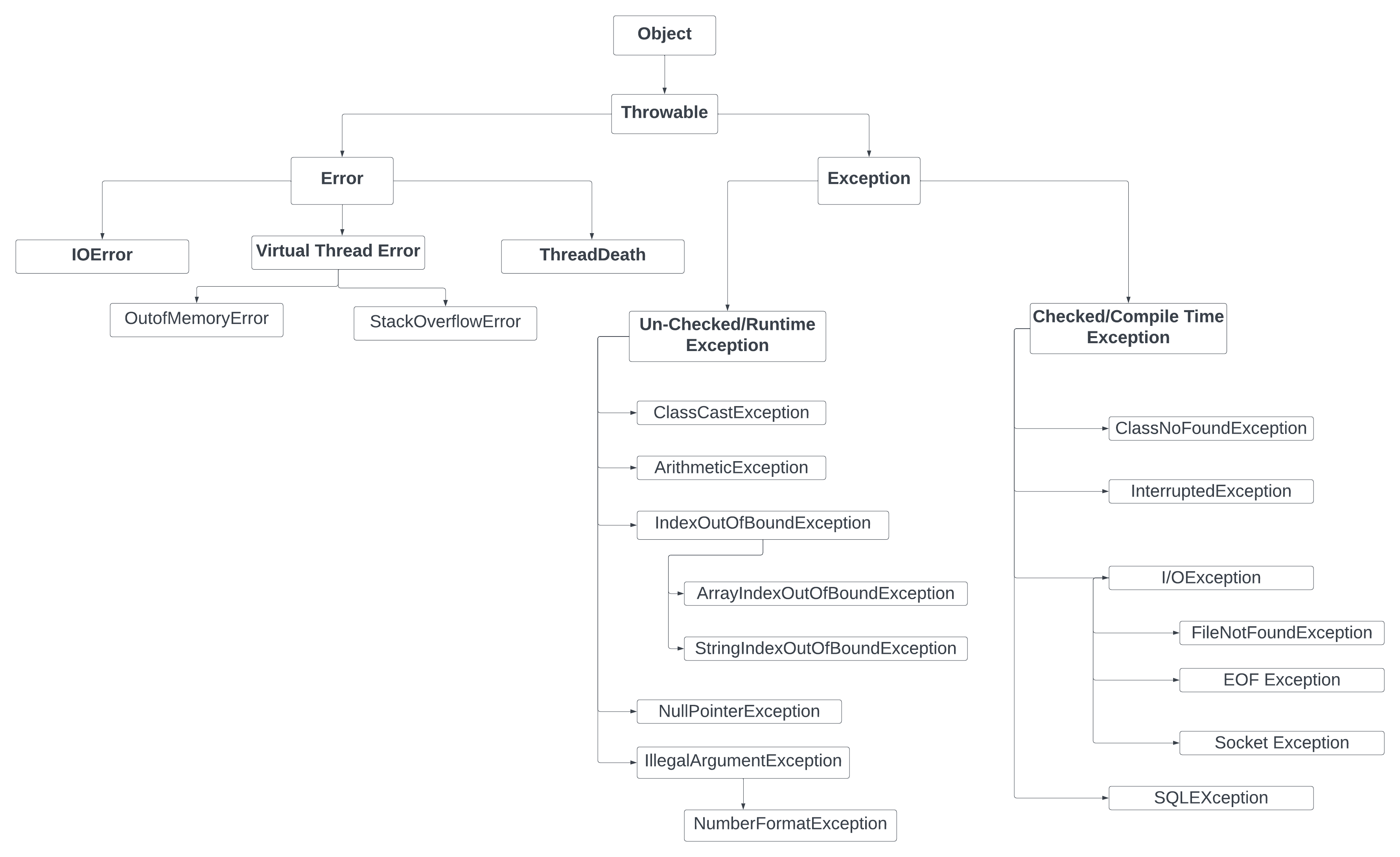 Object is parent of all and its child class is Throwable and it has Error and Exception.
Error - You cannot control. Like OutOfMemoryError, StackOverflowError. These are related to JVM issue. Like JVM can not able to create any new object in heap and heap is full then OutOfMemoryError. Error is unchecked exception as it will compile when running I will get the out of memory error. Error will be in runtime.
public class ExceptionHandling {
    public static void main(String[] args) {
        String[] arr = new String[900000000 * 90000000 * 900000000 * 90000000];
    }
}
//The output
// Exception in thread "main" java.lang.OutOfMemoryError: Java heap space at designPattern.ExceptionHandling.main(ExceptionHandling.java:9)
What is the difference between checked and unchecked exceptions in Java?
Checked exceptions must be declared in the method signature or handled using a try catch block like IO exception. Unchecked exceptions like NullPointerException do not need to be declated or explicitly caught.
Give a scenario when to create a custom checked exception and when to create a custom unchecked exception in Java?
- Custom Checked Exception: Create a custom checked exception when you want to enforce the caller to handle the exception explicitly. For example, if you are developing a library that interacts with a database, you might create a custom checked exception like
DatabaseConnectionExceptionto indicate that the connection to the database failed. This forces the caller to handle the exception, ensuring that they are aware of the potential issue and take appropriate action. The custom checked exception is created when we want to enforce error handling by the caller of the method and when the error is recoverable and can be handled gracefully in response to the exception. - Custom Unchecked Exception: Create a custom unchecked exception when the error is a result of a programming mistake or a condition that should not be recoverable. For example, if you are developing a utility class that processes user input, you might create a custom unchecked exception like
InvalidUserInputExceptionto indicate that the input provided by the user is invalid. This allows the caller to choose whether to handle the exception or let it propagate, as it is considered a programming error that should be fixed rather than handled. The custom unchecked exceptions are usually created for programming errors that the application itself should catch where no specific recovery action is expected from the caller.
How the exception propagation works in Java?
When an exception occurs in a method, the runtime system searches for an appropriate exception handler in the current method. If it doesn't find one, it propagates the exception to the calling method, and this process continues up the call stack until a suitable handler is found or the program terminates. Example - Method 1 calls Method 2, which calls Method 3. If an exception occurs in Method 3 and is not handled there, it propagates to Method 2, and if not handled there, it propagates to Method 1, and so on.
How do you handle a centralised exception handling in Spring?
Global exception handling in Spring can be achieved using the @ControllerAdvice annotation along with @ExceptionHandler methods. This allows you to define a centralized exception handling mechanism that applies to all controllers in your application. You can create a class annotated with @ControllerAdvice and define methods annotated with @ExceptionHandler to handle specific exceptions and return appropriate responses.
Example
// Centralized exception handler
@ControllerAdvice
public class GlobalExceptionHandler {

  // Handle custom ResourceNotFoundException
  @ExceptionHandler(ResourceNotFoundException.class)
  public ResponseEntity<String> handleResourceNotFound(ResourceNotFoundException ex) {
    return ResponseEntity
            .status(HttpStatus.NOT_FOUND)
            .body("Resource not found: " + ex.getMessage());
  }

  // Handle IllegalArgumentException
  @ExceptionHandler(IllegalArgumentException.class)
  public ResponseEntity<String> handleIllegalArgument(IllegalArgumentException ex) {
    return ResponseEntity
            .status(HttpStatus.BAD_REQUEST)
            .body("Invalid input: " + ex.getMessage());
  }

  // Handle all other exceptions (fallback)
  @ExceptionHandler(Exception.class)
  public ResponseEntity<String> handleGeneralException(Exception ex) {
    return ResponseEntity
            .status(HttpStatus.INTERNAL_SERVER_ERROR)
            .body("An unexpected error occurred: " + ex.getMessage());
  }
}
@ControllerAdvice to centralize exception handling across all controllers.
Each @ExceptionHandler method maps a specific exception type to a structured HTTP response.
For example, ResourceNotFoundException returns a 404 NOT_FOUND, IllegalArgumentException returns a 400 BAD_REQUEST, and any unhandled exception falls back to a 500 INTERNAL_SERVER_ERROR.
This ensures consistency in error responses and keeps controller code clean.
Explain how to design a fault-tolerant system using Java exception handling for distributed system.
Use the resilience patterns like Retry, Circuit Breaker, and Fallback to handle transient failures in distributed systems. Implement custom exceptions to represent specific failure scenarios and use centralized exception handling to log errors and provide meaningful responses. For example, when a service call fails due to a network issue, you can retry the operation a few times before falling back to a default response or an alternative service.
What are Java annotations and how are they used in Java programming?
Java annotations are metadata that provide additional information about the code to the compiler or runtime environment. They are used to influence the behavior of the code, provide documentation, and enable frameworks to process the annotated elements. Annotations can be applied to classes, methods, fields, parameters, and other program elements.