Kubernetes Interview
Kubernetes Fundamentals
What is Kubernetes and what problem it solves.
Kubernetes is a container orchestration platform used to deploy, manage, scale, and operate containerized applications.
The main objective of Kubernetes is to manage the operational challenges of running applications at scale, including -
Deploying applications.
Maintaining the desired number of application instances.
Scaling applications.
Self-healing.
Networking.
Service discovery.
Load balancing.
Resource management.
Rolling updates and rollbacks.
Kubernetes follows a desired-state model. We declare what we want, for example - Desired State - 3 replicas of an application should be running.
Kubernetes continuously checks the actual state. Say the state is not matching - Actual State -
Only 2 Pods are running.
The Kubernetes controllers then reconcile the actual state with the desired state.
The main point is Kubernetes is a declarative orchestration platform. We define the desired state, and Kubernetes continuously reconciles the actual state to match it.
Kubernetes Architecture.
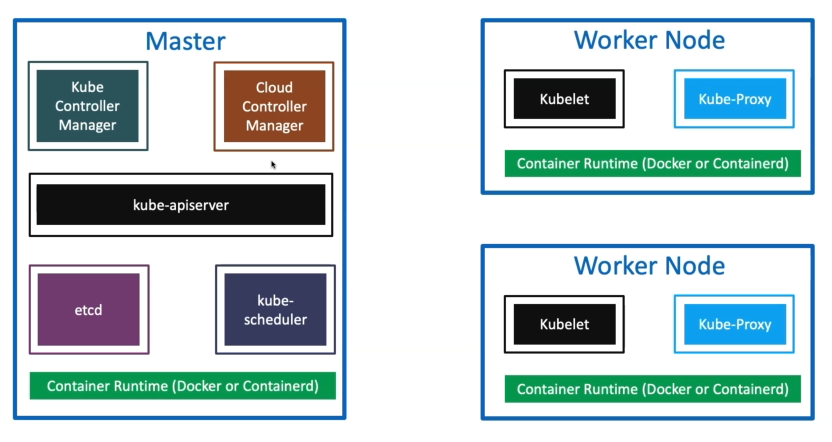
In every worker node there will be kubelet and kube-proxy.
There are 2 major parts - Control Plane/ Master Node and Worker Node.
Control Node / Master Node.
It makes the decision for the cluster.
Maintains the desired state.
Schedules workloads.
Provides the Kubernetes API.
Monitors and manages the cluster.
The major Kubernetes control-plane components are: kube-apiserver etcd kube-scheduler kube-controller-manager cloud-controller-manager — when using a cloud provider
kube-apiserver - It acts as front end for the Kubernetes control plane. It exposes the Kubernetes API.
All communication with Kubernetes cluster done through the API server. Command line tools (like kubectl), Users and even Master components (scheduler, controller manager, etcd) and Worker node components like (Kubelet) everything talk with API Server.
When we execute kubectl create deployment nginx --image=nginx kubectl sends to the API server. The API server - receives the request, Validates/authenticates and authorize it.
Updates the cluster state.
Stores persistent cluster data in etcd.
Other control-plane components observe the new state and act accordingly.
kube-apiserver is the central entry point to the Kubernetes cluster. It exposes the Kubernetes API and acts as the communication hub between users, kubectl, control-plane components, and worker-node components such as kubelet.
etcd - Consistent and highly-available key value store used as Kubernetes’ backing store for all cluster data.
It stores all the masters and worker node information. It acts as a db of the cluster.
It stores - Kubernetes cluster state and configuration, including information about things such as - Nodes, Pods, Deployments, Services, Configurations, Secrets, Cluster metadata, Desired state.
etcd does not store the application container data or the db data. it stores the persistent state and configuration of the cluster and the source of truth for Kubernetes.
kube-scheduler - Scheduler is responsible for distributing containers across multiple nodes.
It watches for newly created Pods with no assigned node, and selects a node for them to run on.
The kube-scheduler is responsible for deciding which worker node should run a newly created Pod.
In what way the kube-scheduler select nodes - The scheduler considers factors such as - Available resources, CPU/memory requirements, Node constraints Affinity/anti-affinity, Taints and toleration.
There is a worker1 - 90% CPU, worker2 - 50% CPU and worker3 - 30% CPU. The new pod needs to be schedule the scheduler needs to evaluate the available nodes and select the suitable node based on the scheduling rules and requirements.
the scheduler does not run the container and it will decide the pod should run in the Node number and the kubelet on the worker node will run the pod.
kube-controller-manager - Controllers are responsible for noticing and responding when nodes, containers or endpoints go down. They make decisions to bring up new containers in such cases.
Node Controller - Responsible for noticing and responding when nodes go down.
Replication Controller - Responsible for maintaining the correct number of pods for every replication controller object in the system. Deployments normally use ReplicaSets, so in modern clusters you'll more commonly hear about the ReplicaSet controller rather than the older ReplicationController resource.
Endpoints Controller - Populates the Endpoints object (connects Services & Pods). It keeps the endpoint information updated as Pods are created, deleted, or changed. Kubernetes has moved toward EndpointSlices for scalable endpoint tracking, but the fundamental idea remains: Kubernetes maintains the backend Pod endpoints associated with Services.
Service Account & Token Controller - These controllers are responsible for service-account-related functionality, including creating default service accounts for namespaces and managing associated API-access credentials/tokens.
Cloud-controller-manager - A Kubernetes control plane component that embeds cloud-provider specific control logic.
• It only runs controllers that are specific to your cloud provider. It is not present in on-premise kubernetes cluster. It is present for control planes GKE, AWS. • On-Premise Kubernetes clusters will not have this component. • Node controller: It communicates with the cloud provider to determine whether a node still exists in the underlying cloud infrastructure after it stops responding. • Route controller: For setting up routes in the underlying cloud infrastructure • Service controller: For creating, updating and deleting cloud provider load balancer • Many more controllers might be present and will differ from cloud to cloud based on that respective cloud Kubernetes Platform design and Integrations to their Cloud products.
Worker Node.
Run the actual application workloads.
Each worker node has - Kubelet
Kube-proxy
Container Runtime.
The Kubernetes control plane manages the cluster and makes scheduling and orchestration decisions, while worker nodes are responsible for running the application Pods.
Container Runtime - Container Runtime is the underlying software responsible for running containers on a Kubernetes node.
Kubernetes interacts with the runtime through the Container Runtime Interface (CRI).
In GKE, the default runtime is containerd, but there are also options such as - Ubuntu with Containerd, Ubuntu with Docker, Windows.
In the cluster node pool the nodes will show the container option.
The container runtime is the software on the worker node responsible for running containers. Kubernetes communicates with it through the Container Runtime Interface, or CRI. containerd is a common runtime. Kubelet - Kubelet is the agent that runs on every worker node in the cluster. This agent is responsible for making sure that containers are running in a Pod on a node.
The pod A assigned to worker Node 2. The kubelet on worker node 2 will -
Receives/observes the Pod specification through the Kubernetes API.
Works with the container runtime.
Starts the required containers.
Monitors them.
Reports node and Pod status back to the control plane.
Scheduler decides where the Pod runs. Kubelet makes sure the Pod actually runs on that node.
Kube-Proxy - It is a network proxy that runs on each node in your cluster and implement Kubernetes Service networking. It maintains network rules on nodes. In short, these network rules allow network communication to your Pods from network sessions inside or outside of your cluster.
Deploying an Nginx pod.
When we execute kubectl create deployment nginx --image=nginx
kubectl - API server
API server - etcd
The API server validates teh request and persists teh relevant cluster state in etcd.
The controller notices the deployment needs the required workload or replica state and the pod or the rs is created.
The Scheduler notices that the new pod creates and does not have a node assigned. It will select a suitable worker node.
The kubelet on the worker node1 sees the pod is assigned to its node. It tells teh container runtime to create or run the container.
In case the application is exposed through the Kubernetes service then the node networking rules managed as part of kube-proxy functionality help direct Service traffic to the appropriate Pod endpoints.
Kubernetes Request and object Lifecycle.
What happens internally when we run kubectl apply -f?
kubectl reads YAML manifest ↓ Request sent to kube-apiserver ↓ Authentication ↓ Authorization ↓ Validation / Admission processing ↓ Desired object state stored in etcd ↓ Controllers observe desired state ↓ Scheduler selects a Worker Node for unscheduled Pods ↓ kubelet on the selected Node receives the Pod specification ↓ kubelet asks container runtime to create containers ↓ Pod starts ↓ Controllers continue monitoring desired state
What is a Pod?
A Pod is the smallest deployable unit in Kubernetes.
Applications are deployed as containers running inside Pods. Containers need an execution and networking abstraction inside Kubernetes. The source notes explain that Pods solve the problem of managing container networking and provide an abstraction around containers.
The source notes describe a Pod as an abstraction that contains containers and provides:
Its own network namespace An IP address A range of ports for containers
When more application instances are required, Kubernetes creates additional Pods.
What is containerPort?
containerPort represents the port on which the application inside the container listens.
The sample postgreSQL pod code.
apiVersion: v1
kind: Pod
metadata:
  name: postgres
  labels:
    app: postgres
spec:
  containers:
  - name: postgres
    image: postgres:9.6.17
    ports:
    - containerPort: 5432 # The postgreSQL application run in port 5432.
    env:
    - name: POSTGRES_PASSWORD
      value: "pwd"
Can a pod have multiple container?
A Pod can contain multiple containers. A common pattern is - main application container and sidecar container. Examples of sidecar or helper responsibilities include -
Logging Monitoring Proxying Backup operations Supporting application processes
The containers inside the same Pod share the Pod networking namespace. Containers inside the same Pod share networking. They communicate using localhost:
Give a code example of multi container pod?
The code is a sample of nginx container and curl sidecar container.
apiVersion: v1
kind: Pod
metadata:
  name: nginx
  labels:
    app: nginx
spec:
  containers:
    - name: nginx-container
      image: nginx
      ports:
        - containerPort: 80

    - name: sidecar
      image: curlimages/curl
      command: ["/bin/sh"]
      args:
        - "-c"
        - "echo Hello from the sidecar container; sleep 300"
The command to apply and verify.
kubectl apply -f nginx-sidecar-container.yaml
kubectl get pod
# Expected output.
# NAME    READY   STATUS    RESTARTS   AGE
# nginx   2/2     Running   0          74s

# Access the sidecar container.
kubectl exec -it nginx -c sidecar -- /bin/sh
# test the nginx container.
curl localhost:80
Kubernetes Manifest.
What are the main parts of the Kubernetes YAMl manifest?
The source notes identify the following main parts - apiVersion kind metadata spec
apiVersion - Defines the Kubernetes API version for the object.
kind - Defines the Kubernetes resource type. The type are pod, service, replicaSet, Deployment.
metadata - contains object information like name, label.
spec - defines the desired configuration.
What is the difference between imperative and declarative Kubernetes configuration?
You define the desired state in YAML.
Example - kubectl apply -f deployment.yaml
Imperative - You create or modify resources directly using commands.
Example - kubectl create deployment my-app --image=nginx
What is replicaSet?
A ReplicaSet maintains a stable number of replica Pods.
The desired state replicas:3 3 pods are running and one pod fails replicaset creates a replacement.
The source notes identify ReplicaSet benefits including - Availability Scaling Maintaining replica count Working with labels and selectors
How does the replicaset knows which pods belong to it?
ReplicaSets uses - Labels+Selectors.
selector:
  matchLabels:
    app: my-helloworld

# The pod template must have matching labels.
labels:
  app: my-helloworld
apiVersion: apps/v1
kind: ReplicaSet
metadata:
  name: my-helloworld-rs
  labels:
    app: my-helloworld
spec:
  replicas: 3
  selector:
    matchLabels:
      app: my-helloworld
  template:
    metadata:
      labels:
        app: my-helloworld
    spec:
      containers:
        - name: my-helloworld-app
          image: stacksimplify/kube-helloworld:1.0.0
kubectl create -f replicaset-demo.yml and to verifi kubectl get replicaset
# Describe
kubectl describe replicaset my-helloworld-rs
# Verify pods
kubectl get pods
# Inspect the ownership.

# The source note mention using the pod yaml to inspect the rs relationship.
kubectl get pods <pod-name> -o yaml
What is the Kubernetes Deployment?
A Deployment manages application rollout and desired state. The relationship flow Deployment - ReplicaSet - Pods. When a Deployment is created, Kubernetes creates a ReplicaSet, which creates and maintains the Pods. A Deployment manages Pods declaratively. It helps you define - Application/container image Number of replicas Labels and selectors Update strategy
Imperative approach — Create it using kubectl commands.
# Create nginx deployment
kubectl create deployment nginx-deployment --image=nginx
# It will create deployment name nginx-deployment using the image nginx

# Creating with multiple replica.
kubectl create deployment nginx-deployment \
--image=nginx \
--replicas=3

kubectl get deployments
kubectl get replicasets
kubectl get pods

# Scale the deployment
kubectl scale deployment nginx-deployment --replicas=5
apiVersion: apps/v1
kind: Deployment

metadata:
  # Name of the Kubernetes Deployment resource
  name: nginx-deployment

  labels:
    app: nginx

spec:
  # Desired number of Pod replicas
  replicas: 3

  # The Deployment uses this selector to identify
  # the Pods managed by this Deployment
  selector:
    matchLabels:
      app: nginx

  # Template used to create Pods
  template:
    metadata:
      labels:
        # The Pod label must match the Deployment selector
        app: nginx

    spec:
      containers:
        - name: nginx
          image: nginx
          ports:
            - containerPort: 80
What do you first verify if the pods looks like running but the users are seeing some errors ?
There are mainly steps to follow in order.
Pod Status.
The first step is to separate the two ideas - Verify in case the container is up vs the Kubernetes is sending the traffic to the pod.
The first step is to see the readiness and a pod can be running but its not ready. The command like kubectl get pods and kubectl describe pod <pod-name> and look at the readiness probes in case failing then it should not receive traffic.
Verify Service and Endpoints.
Verify the service URL and it has healthy backend. Teh command like kubectl get svc and kubectl get endpoints <service-name>
When there is no endpoints then its mainly something like pod readiness failing, labels not matching the service selector or the workload deployed in different namespace.
Inspect Events.
The events explain thing in plain text like probe failure, failed mount or image pull issue. The command like kubectl describe pod <pod-name> and kubectl get events --sort-by=.metadata.creationTimestamp gives the idea of the issue.
Pods logs.
In case the endpoint exists and the error persist then verify the application logs like kubectl logs <pod-name> The common issue may be like dependency failures, Timeout errors, Misconfigured environment variables or Network policies blocking traffic.
Application Level Debugging.
When Kubernetes plumbing looks fine, investigate the app itself - Database connectivity, External API calls, Resource limits (CPU/memory), Network policies or firewalls.